By Nic Lindh on Friday, September 17, 2010 in tech , media · 7 min read
Building a news site with WordPress
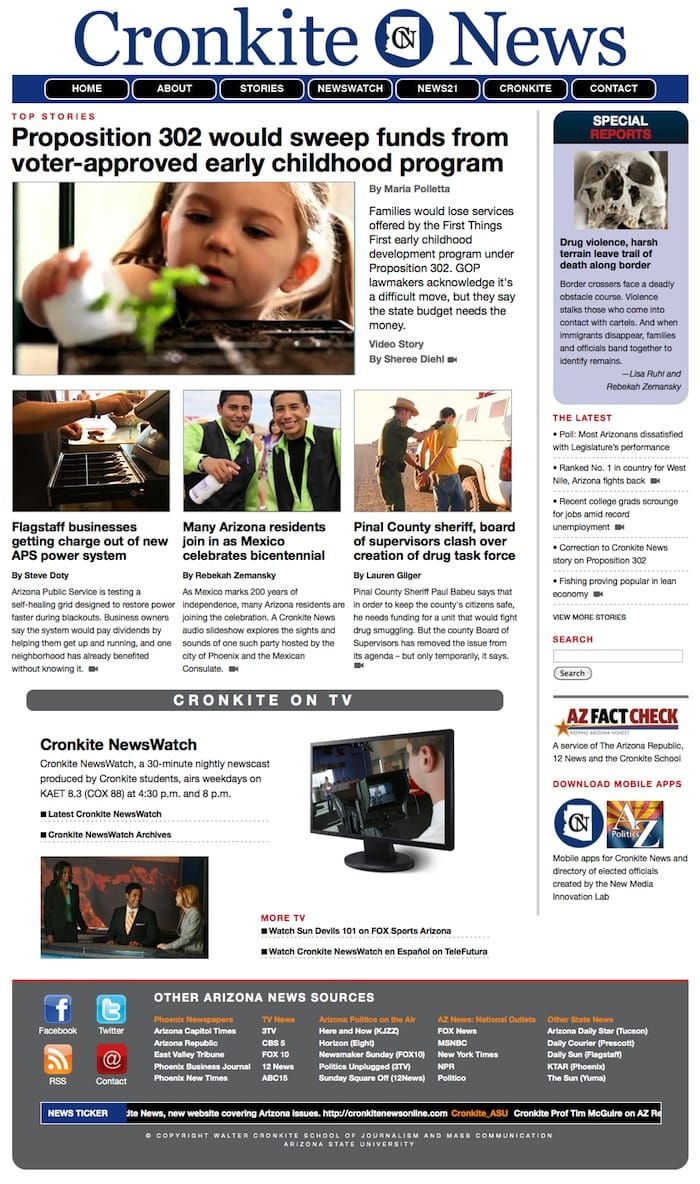
At work we recently launched a website providing news on Arizona public policy issues in text, video and photo format called Cronkite News. I thought it might be helpful to post some thoughts on how we built the site and some of the challenges we found.
The platform
We created the site on WordPress since it provides a nice content-creation environment for people who aren’t technical, and it’s a solid foundation on which to build. Not that we didn’t find some serious gotchas, as detailed later in this post, but the main experience was very positive. WordPress fits nicely in my head and the journalists using the system are finding it easy to work with.
There’s been a lot of chatter on the Internet over the years whether WordPress is a “real” Content Management System (CMS) or if it’s “just” a blog engine. After building Cronkite News I’ll definitely say, yes, it’s a CMS.
If you’re planning on building a site like this, definitely investigate your options, whether it be Drupal, building something custom in Django or Ruby on Rails.
But remember that if you forgo WordPress, you forgo a lot of functionality and user interface refinements. Don’t underestimate how important it is for productivity for a system to be easy to use.
Features of the site
Cronkite News uses standard WordPress categories to determine the kind of story and the story’s front-page placement.
This is all done through the magic of the Loop. If you’re going to do anything custom at all with WordPress, you have to become friendly with the Loop.
For example, the site needed a way to designate which stories go on the front page and in which position. I set up different categories for the different placements and put custom loops on the front page template, which simply go through each category and look for the latest post in that category. So a lead story is put in the category “Front Page 1” and the system knows where to display it. A benefit of this is that the previous lead story doesn’t have to be demoted in the system. It’s older, so it doesn’t get shown. No extra steps for the journalists running the site to remember.
Stories that have videos attached are designated in the UI with a little video icon. This is pervasive in all the archives and listings. If there’s a video, it gets the video icon which allows a viewer to immediately watch the video without going to the story page. I think it’s pretty slick, but then I’m biased. The light box is provided by Shadowbox.js.
Cronkite News Service also provides content free for use for news organizations at a companion site, and we wanted a way to automate loading that site with content as much as possible. The client site follows AP wire service style, so there’s no avoiding some manual labor for our poor editor, but we installed a plugin called FeedWordPress on the client site and then built a custom RSS feed on the public-facing site which the client site then consumes. Very handy and a huge time saver.
HTML and CSS
The HTML and CSS on the site were created using Blueprint and Carrington JAM (Just Add Markup). These were both excellent tools: Blueprint creates a bulletproof grid and handles many cross-browser oddities with a minimum of fuss; Carrington JAM makes it very easy to handle conditional situations without a lot of if-then PHP code. Simply drop PHP code into files with the correct names and calls are correctly routed. Beautiful. Another massive win with Carrington JAM is the debug functionality—turn it on and the site spits out the names of the template files creating the current page. This is a huge time-and-sanity saver since a complex site will have quite a number of template files.
Gotchas with custom fields
In order to implement all the functionality of the site, there are 71 custom fields across four different content types. Yes, 71.
Why so many custom fields? Because they allow our journalists to simply fill out a form instead of having to wrestle with HTML templates, which is much more error-prone and time-consuming.
As a trivial example, a story can have up to three bylines. These go in custom fields. The system will then present the bylines differently depending on the number of bylines:
By JOHN DOE
or
By JOHN DOE and ROB APPLESEED
or
By JOHN DOE, ROB APPLESEED and MARY DOE
Having the bylines in custom fields means the journalists doing the filing don’t have to worry about the formatting, and if we ever decide to format the bylines differently it’s just a matter of changing the PHP logic instead of motoring through all existing content in the database with a search and replace. Like if for example AP finally gained their sanity and allowed the Oxford comma.
(If you’ve had the misfortune of having do this, you know what I’m talking about. If you haven’t, consider yourself lucky.)
Here’s the gotcha: By default WordPress will delete all custom field content when you autosave or use the revision system. Yup, irreversible data loss.
Take deep breaths.
Since most of our content lives in custom fields, this is a huge issue for us.
We discovered this very late in the process once we started training staff. The workaround is to set a ridiculously long timeout for autosave (I set it to 41 hours) and turn off revisions.
(You can supposedly code in hooks to the autosave and revisions functions to make them not vaporize your custom fields, but we found this way too late in the process to do a bunch of custom coding. I remain hopeful custom fields will become first-class WordPress citizens in a future update.)
To accomplish this, add the following to your wp-config.php:
define(’WP_POST_REVISIONS’, false); //Revisions eat custom fields
define(’AUTOSAVE_INTERVAL’, 60000); //So do autosaves
Another major issue with custom field content is that the built-in WordPress search does not search custom fields.
Again with the deep breaths.
We found a plugin called Search Everything, which does indeed search everything. Except it searches for the terms in the posts and the custom fields. And, not or. So a search for “John Smith taxes” where John Smith is a writer and has filed a story containing the word “taxes” will not return any posts, since “John Smith taxes” does not exist in the custom fields.
Fortunately, we have a real programmer on staff and he was able to hack the SQL queries emitted by the plugin to find content for searches like that.
And lastly, WordPress 3.0 added a password query which broke the plugin for users who aren’t logged in. More hacking by our programmer and you can now search the site even if you aren’t logged in.
(Our programmer rocks. I can do basic cro-mag PHP hacking, but for some issues you need a real programmer. Don’t embark on a project like this without the phone number or chat handle of one.)
I’m hopeful the WordPress team will make custom fields more integrated into the system in the future. But for now, know that you will have issues and that you will need a good programmer to resolve them.
Photos and videos, oh my
We decided to forgo the built-in multimedia management system in WordPress. Instead, we have an assets folder on the Web server exposed through Apple File Protocol (AFP)—i.e., it shows up as a regular volume on the desktop. This lets journalists work in a familiar folder structure instead of clicking around on the website. With non-technical people, the more familiar you keep things the less problems you will have.
Also, we create a lot of video, and uploading video files through a Web form could bottleneck the production process. One day it’ll be feasible, but today isn’t that day.
Summary
WordPress performs well as a full-blown CMS for a news publication. But watch out for the data loss with custom fields.
You have thoughts? Comments? Salutations? Send me an email!
Related reading you might enjoy
Electric cars are fun, dammit
Let’s talk about how fun it is to have a go-cart people mover.
Watching M*A*S*H in a pandemic
You never know how a creative expression will affect you.
Impressions moving from an Apple Watch Series 3 to Series 5
Is there reason to upgrade from a 3 to a 5?
Renewing the nerd card: Installing Ubiquiti UniFi in the house
The Internet tells Nic to install Ubiquiti gear in his house, so he does, and now he has thoughts.
Working in the pod mines
What I wish I’d known when I started podcasting.
A report from surveillance cylinder land as we wait for HomePod
Nic reports his experiences so far with voice computing from Amazon and Google and is a bit mystified at the reaction to Apple’s HomePod.
iPhone X impressions
After a few weeks of using iPhone X I’m ready to join the congratulatory choir.
Smart homes for the wealthy
Nic is interested in smart homes. His contractor let him know how the wealthy are already using them.
Getting started with podcasting
A concise guide to getting started with podcasting, including equipment, editing, mic technique and hosting.
Review: Novels of the Malazan Empire
A worthy inclusion to the Malazan canon and great high fantasy to disappear into in troubled times.