By Nic Lindh on Friday, September 14, 2012 in tech · 5 min read
Ebook creation is still a bag of hurt

I’ve just finished creating an ebook version of the voting rights investigation I project managed this summer, and now I’m sad.
Sad because very little has changed since last year when I wrote my long post on the sorry state of ebook publishing tools.
The current state of affairs
Here’s where we are today, in 2012: Most ebook readers render the ePub standard with the exacting taste of a sailor on shore leave. Trying to do anything fancy in ePub, like, you know, floating text around an image will end in tears in most readers.
Remember: ePubs are essentially self-contained websites with some metadata wrapped around them. That’s all they are. And yet, things we’ve been able to do reliably on the Web since the ’90s are steaming bags of fail. Sigh.
Fortunately, looking at the readers people actually use, you are probably safe to make sure things work right on only two platforms: Apple and Amazon. That’s good news, right? Yes, yes it is. To a point.
Because Apple supports ePub and Amazon supports mobi. For practical purposes mobi is the paint-sniffing older brother of ePub—it can do some of what ePub can do, poorly. At least it’s fairly simple to convert from ePub to mobi, but you end up maintaining two source documents, one fancy ePub for Apple, and a simpler one for conversion to mobi. This way lies madness.
But, aha! What about Amazon’s KF8? It looks great! You can finally do things like fixed-layout on the Kindle. Uh-huh. If you only target the latest Kindles, including the Fire, maybe, after your sins have been cleansed through drudgery, as ePub guru Liz Castro found out.
To add to the disillusionment, KF8 is not supported in the Kindle app for that little niche platform, the iPad. Check out the marvelously vague FAQ on Amazon’s KF8 page:
Q: Will KF8 capabilities be available on all Kindle devices?
A: Kindle Fire is the first Kindle device to support KF8 - in the coming months we will roll out KF8 to our latest generation Kindle e-ink devices as well as our free Kindle reading apps.
Good luck finding a list of current compatibility.
Today is not the day to target KF8.
So, what to do?
The first thing you must do is accept reality. If you want to go cross-platform, you will need to Keep Things Simple, indeed.
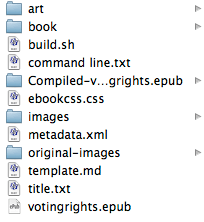
For this ebook, I ended up using the wonderful Pandoc. It’s a tool of deep nerditry, but once you grok it, you end up with a ton of flexibility and above all, a sane workflow.
Using Pandoc enabled me to create the book in Markdown with just a few Markdown-formatted text files and image folders. It was wonderful.
Don’t get me wrong, it does take some work and requires you to be comfortable on the command line, but man, once you have Pandoc set up right, it’s pure joy.
It hits every nerd button for me: Markdown in text files version-controlled by Git and as scriptable as you could possibly want.
I highly recommend it for nerds. Which is a big problem: at this point, ebook creation is the dominion of nerds.
Peering into the crystal ball
Despite the meteoric rise of ebook sales, they are still a pain to create, especially if you want to do anything fancy, like, oh, lay things out on the page. And unfortunately, the future doesn’t look good either.
As long as Apple and Amazon maintain incompatible standards, and especially with Amazon dragging their feet on rolling out KF8 to all their devices and apps, creating ebooks will continue to be much, much harder than it should. The dread specter of mobi will continue to haunt us for a long time.
It’s bewildering that no software company has stepped in with a good general-purpose GUI tool for creating ebooks. This is necessary so we can get graphic designers onboard with ebooks. You know, the people who know how to make things look good. It’s still way too much the dominion of nerds.
Apple has shown that it can be done with iBooks Author, even though of course they had the luxury of targetting their own standard which they completely control. It’s a hard problem, but it’s not like a company like Adobe lacks talented software engineers.
Books generated in iBooks Author sure look fantastic. But they can only be viewed on iPads and can only be sold through Apple’s bookstore. And to make things worse, you have to create the book from scratch in iBooks Author—there’s no way to import an existing ebook.
Unless you sell textbooks to school districts that have adopted iPads or you just have way too much time on your hands, iBooks Author is a non-starter.
That being said, iBooks Author is the tool Adobe should have released two years ago instead of being all hung up on shoehorning ebook authoring into InDesign.
They’ve made improvements in InDesign CS6 that make it less painful to work with ebooks, and if you spend most of your time in InDesign, you can make it work.
It makes sense to use InDesign if you start with a product intended for print and then want to crank out ebook versions of the same content. But if you’re starting from a website and going straight for ebook, skipping the print step, the legacy functionality of InDesign becomes a burden.
Few things would make me happier than Adobe—or anyone, really—releasing a product intended from the ground up to create beautiful ebooks.
But so far, the outlook for easy ebook authoring is cloudy with a strong chance of rain.
As a bonus, here’s John Siracusa of the fabulous Hypercritical talking about his woes converting his epic OS X review to ebook format, running into a lot of the same issues covered here with the added delight of an infuriating Amazon store glitch.
You have thoughts? Comments? Salutations? Send me an email!
Related reading you might enjoy
Electric cars are fun, dammit
Let’s talk about how fun it is to have a go-cart people mover.
Impressions moving from an Apple Watch Series 3 to Series 5
Is there reason to upgrade from a 3 to a 5?
Renewing the nerd card: Installing Ubiquiti UniFi in the house
The Internet tells Nic to install Ubiquiti gear in his house, so he does, and now he has thoughts.
Working in the pod mines
What I wish I’d known when I started podcasting.
A report from surveillance cylinder land as we wait for HomePod
Nic reports his experiences so far with voice computing from Amazon and Google and is a bit mystified at the reaction to Apple’s HomePod.
iPhone X impressions
After a few weeks of using iPhone X I’m ready to join the congratulatory choir.
Smart homes for the wealthy
Nic is interested in smart homes. His contractor let him know how the wealthy are already using them.
Getting started with podcasting
A concise guide to getting started with podcasting, including equipment, editing, mic technique and hosting.
What to expect when you’re expecting a Hackintosh
There is unrest in the Mac community about Apple’s commitment to the platform. Some are turning their eyes to building a Hackintosh to get the kind of computer Apple doesn’t provide. Here’s what it’s like to run a Hackintosh.
The car is going digital and that’s a good thing
Car nerds are dealing with some cognitive dissonance as car technology changes.